
Frequently asked questions
The answers to start and install Boreale, verify the download and use Berry‑AI and updates.
Startup and installation
What do I do if the installer stops at «Configure the network»?
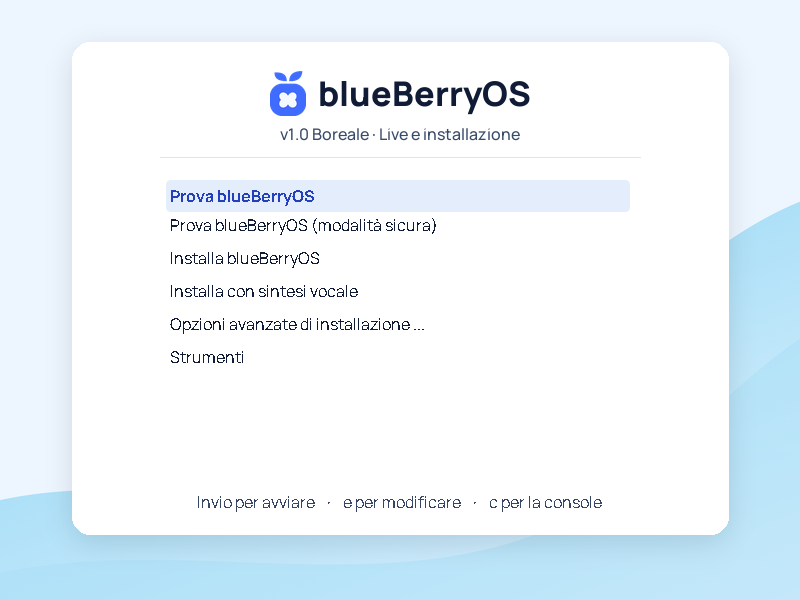
Wi‑Fi can connect while the installer waits for a DHCPv6 response. If it stops there, launch the offline installation from the UEFI menu. The installer may still ask you for the computer name.
- If you are in the entry editor Try blueBerryOS, press Esc to return to the menu.
- Highlight Install blueBerryOS and prizes e.
- In the line
linuxthat contains/install/gtk/vmlinuz, addnetcfg/enable=falseright before---.
vga=788 netcfg/enable=false --- quietPress Ctrl+X or F10 to start. The change applies to that boot. After installation you can connect from GNOME settings.
How do I go from live to the graphical installer?
Save any files to persistent media, leave the USB stick or ISO connected and reboot with sudo systemctl reboot. In the start menu choose Install blueBerryOS.
Can I install Boreale without Internet?
The ISO contains the system and included apps. You can install from a stick or from a VM and configure the network on the first boot in GNOME. The Internet is used to get updates, alerts and other AI models.
How do I see the installer log?
During installation, press Ctrl+Alt+F4 to open the registry. Write down the passage you reached and the last visible lines to help those examining the problem.
Downloads and requirements
Can I download blueBerryOS Boreale?
The page Downloads shows the availability of the official ISO and the corresponding SHA‑256 file. The same image allows you to start live or install Boreale.
How do I check the downloaded ISO?
Save the ISO e SHA256SUMS in the same folder. From a Linux terminal in that folder run sha256sum -c SHA256SUMS and check that the file is valid.
Will it work on my PC?
This ISO is for AMD64 PCs, also called x86‑64. Go live from USB to test screen, audio, Wi‑Fi and other peripherals. On Apple Silicon, this image requires a VM with x86‑64 emulation, such as QEMU.
GNOME Desktop
Why is the GNOME Software catalog empty?
The Verified Apps Only filter can hide applications from Debian repositories.
Open GNOME Software → Menu → Preferences and turn off Verified Apps Only. Return to Explore and search for GIMP to check that applications are visible again.
The “0 applications installed” label counts installed apps associated with that source. Find available apps in Explore.
How do I display files and folders on my desktop and keep the dock always visible?
On blueBerryOS Boreale you can use Desktop Icons NG (DING) for the desk and Dash to Dock for the dock. If the two extensions are not already installed, open Terminal and run these commands.
sudo apt update
sudo apt install gnome-shell-extension-desktop-icons-ng gnome-shell-extension-dashtodock
After installation, log out of your GNOME session and log back in. Open Extensions from the Applications menu and activate both extensions.
- Icons on the desk. Open File → Desktop and copy the files and folders you want to view there. In Desktop Icons NG preferences you can also show the personal folder and the trash can.
- Dock always visible. Open Dash to Dock preferences with the gear. In Location and size, deactivate Intelligent automatic hiding (Intelligent autohide). In the same tab you can choose to place the dock at the bottom.
Berry‑AI and updates
How do I update Berry‑AI on Boreale already installed?
Connect to the Internet and open Berry Security → Updates → Open Software. Check for updates and install Berry‑AI 1.1.0 or the next proposed version. Then reopen Berry‑AI from the blueBerryOS menu to use the new graphical interface.
If you use Terminal, update the APT indexes, install the Berry‑AI update, and check the installed version.
sudo apt update
sudo apt install --only-upgrade blueberry-berry-ai
dpkg-query -W blueberry-berry-ai
If it appears is not in the sudoers file and you have the password of root, enter with su - and run the two commands apt without sudo. Type exit at the end.
Does Berry‑AI need the Internet?
The included Qwen2.5-1.5B-Instruct template processes answers on the PC and works offline. A connection is required to download other templates. You can follow the guide to GGUF models.
Where can I find updates and release notes?
Open Berry Security → Updates and Alerts. Compare installed and candidate versions and use Open Software to install. There update guide includes the Debian and blueBerryOS repositories and the project feed.
How do I resolve the “dpkg was interrupted” error?
APT shows E: dpkg was interrupted, you must manually run 'sudo dpkg --configure -a' to correct the problem. when a previous installation or update has stopped and some packages are still to be configured.
Open Terminal and complete the configuration of pending packages.
sudo dpkg --configure -aIf the command completes without errors, try the update again.
sudo apt-get upgradeIf dpkg still reports an error, keep the last lines of the message to identify the package blocking the configuration.
Why doesn't GNOME Software show applications to install?
Connect to the Internet and check from Terminal which sources APT uses. VLC serves as an example application available on Debian.
sudo apt update
apt-cache policy
apt-cache policy vlc
For Debian search trixie, trixie-updates And trixie-security. The project package archive is get.blueberrylinux.com. To also see the configured sources that APT can't reach, check the source files.
grep -H -E '^(deb |URIs:|Suites:|Components:|Enabled:)' \
  /etc/apt/sources.list /etc/apt/sources.list.d/*.sources \
  /etc/apt/sources.list.d/*.list 2>/dev/null
An offline installation may leave only the dongle configured. If it's missing /etc/apt/sources.list.d/debian.sources and the Debian online archives are also missing from the other files, copy the example provided by APT, if present, and update the indexes.
sudo install -m 644 /usr/share/doc/apt/examples/debian.sources \
  /etc/apt/sources.list.d/debian.sources
sudo apt update
apt-cache policy vlc
If APT reports an error on cdrom: after removing the key, open /etc/apt/sources.list with an administrator editor. Prepend # to the line starting with deb cdrom:, save and repeat sudo apt update.
If APT shows a candidate version for VLC, reopen Software and update the catalog from the tab Updates. The blueBerryOS archive has a separate configuration. Boreale repository · Debian APT sources
Why does the terminal say «is not in the sudoers file»?
The user you are logged in with is not authorized to use sudo. If during installation you set a password for root, you can use su - and enter that password. In the administrative session, run the above commands without sudo, then type exit.
If you left your password blank root, normally the installer enables sudo for the first user created. Verify your account with id -nG and, if necessary, log in with a PC administrator account. Account and password in the Debian installer
Why am I seeing a Berry warning without an update available?
The project can post maintenance guides or communications via the feed. Instead, APT offers a new version only when the corresponding package is installed and has an update available.